

On this page
- WhatsApp Business app or WhatsApp Business Platform?
- Step 1: Set up your business profile
- Step 2: Build your catalogue
- Step 3: Handle orders without losing track
- Step 4: Take payments safely
- Step 5: Get more people to message you
- The limits of selling only on WhatsApp
- WhatsApp plus an online store
- Mistakes WhatsApp sellers make
- Your WhatsApp selling checklist
To sell on WhatsApp Business, install the free WhatsApp Business app, set up a complete business profile and product catalogue, and use quick replies, labels and greeting and away messages so no order gets lost. Share your number and catalogue link everywhere your customers are, take payment safely, and when the chats start taking over your day, add an online store and keep WhatsApp for conversations.
The WhatsApp Business app is Meta's free app for small businesses: regular WhatsApp plus a business profile, a catalogue, quick replies, labels and automatic greeting and away messages. This guide sets up each piece step by step and includes messages you can copy and save as quick replies today.
WhatsApp Business app or WhatsApp Business Platform?
WhatsApp offers two things for businesses, and it helps to know which one you need.
| WhatsApp Business app | WhatsApp Business Platform | |
|---|---|---|
| What it is | An app on your phone, used by hand | WhatsApp connected to software |
| Cost | Free | Charged per message (replies have a monthly free allowance) |
| Best for | One owner, a few dozen chats a day | Automatic order updates, reminders, offers, a team on one number |
| Catalogue, labels, quick replies | Yes | Through the software you connect |
| Automatic messages | Greeting and away messages only | Order updates, cart reminders, chatbots |
The app is the simplest place to start. Move to the Platform, usually through your store software, when you need messages to go out automatically.
Step 1: Set up your business profile
Download WhatsApp Business from the Play Store or App Store and register your business number. It is free and adds the tools a seller needs (WhatsApp's list of business features).
Fill in your business profile completely:
- Business name and category, exactly as customers know you.
- A short description: what you sell and where you deliver.
- Address, or "delivery only" with the areas you cover.
- Opening hours, so customers know when to expect a reply.
- Email and website, if you have them.
- A clear profile photo: your logo or your shop front.
A complete profile makes a new customer trust you before they type the first message.
Step 2: Build your catalogue
The catalogue shows your products inside WhatsApp, so customers browse instead of asking "what do you have?"

- Add each product with a clear photo, the price and a short description. WhatsApp allows up to 10 images per item.
- Group products into collections: "Sarees", "Kurtas", "New arrivals", "Under ₹999".
- Keep it up to date. Remove or mark sold-out items the same day. A customer who orders something that ran out last week is a disappointed customer.
- Share links to the catalogue or to single products in chats, on your status and in your Instagram bio.
Taking product photos that sell: shoot in daylight near a window, on a plain white or light background, with the product filling the frame. Take one front photo, one close-up of the detail or fabric, and one showing size or fit.
Step 3: Handle orders without losing track
WhatsApp orders go wrong when details are spread across ten messages. Three tools fix most of it.
Quick replies: save the answers you type every day
Type "/" in a chat to insert a saved reply. Here are six worth saving, ready to copy and adapt:
Example: /order: "Thank you for ordering! Please send in one message: the items and sizes, your name, full address with a landmark, and your delivery date. We will confirm the total and payment link."
Example: /pay: "Your total is ₹____. Please pay to UPI ID ____ or scan the QR code below, and send a screenshot. We will confirm once the payment reaches us."
Example: /confirmed: "Payment received, thank you! Your order is confirmed and will be delivered on ____ between ____."
Example: /delivery: "We deliver to ____ and nearby areas. Delivery is ₹, free on orders above ₹." (Our guide on setting delivery charges helps you pick these numbers.)
Example: /shipped: "Your order is on its way! Tracking: ____. Expected delivery: ____."
Example: /return: "Sorry it did not work out. Please send a photo of the item within ____ days of delivery and we will arrange an exchange or refund as per our policy."
Labels: one status per chat
Tag every chat with its stage, and filter by label to see what is pending:
| Label | Meaning |
|---|---|
| New order | Details received, not yet confirmed |
| Waiting for payment | Total sent, payment not received |
| Paid | Payment checked in your bank app |
| Packed | Ready to dispatch |
| Delivered | Done; ask for a review |
| Follow up | Asked a question, has not ordered yet |
Greeting and away messages
Example: Greeting: "Hi! Welcome to ____. Browse our catalogue here: ____. To order, send the items, your name and address in one message. We reply between 10 am and 8 pm."
Example: Away: "Thank you for your message! We are closed now and will reply after 10 am. You can browse our catalogue in the meantime: ____."
Step 4: Take payments safely
The usual way is UPI (our guide on accepting online payments compares all the options). Share your UPI ID or a UPI QR code (make one with a UPI QR code generator); the customer pays and sends a screenshot.
Warning: Always check the payment in your bank or UPI app before you dispatch. Screenshots are easy to fake, and a "payment pending" screenshot does not mean the money has arrived.
Also:
- Write down which order each payment is for, or note the order on the payment.
- For cash on delivery, confirm the order the day before or on the morning of delivery, and consider asking for a small advance on large orders. Our guide on reducing fake cash on delivery orders covers more ways.
- Send a simple invoice for every order. An invoice generator makes one quickly.
Step 5: Get more people to message you
- A WhatsApp link opens a chat with you in one tap. Make one with a ready message using a WhatsApp link generator, and put it in your Instagram bio, Google Business profile and email signature.
- A QR code to your chat at your shop counter and on packaging.
- Status updates with new arrivals and offers. People who saved your number see them.
- Broadcast lists for customers who agreed to hear from you. In the app, they only reach people who saved your number.
Only send offers to customers who asked to hear from you. WhatsApp's business policy requires opt-in permission, and WhatsApp can limit or remove access for numbers that break it. Customers who get messages they did not ask for also report and block them.
The limits of selling only on WhatsApp
WhatsApp is excellent for conversations. As orders grow, it becomes hard to run a business inside it:
- Every order is typed by hand, and every detail checked by hand.
- Payments are matched by screenshots.
- There is no record of what each customer bought before, unless you scroll.
- You cannot see which products sell best, or who has not ordered in a month.
- Stock is in your head. Two customers can order the last piece.
- Your phone is the shop, and the shop closes when you sleep or the battery dies.
If you spend hours a day answering "price?" and "available?", you have outgrown WhatsApp-only selling.
WhatsApp plus an online store
The answer is not to stop using WhatsApp. It is to let an online store take the orders and keep WhatsApp for talking.

| Job | WhatsApp only | WhatsApp plus a store |
|---|---|---|
| Showing products | Catalogue, scroll by scroll | Website and app with search and filters |
| Taking an order | Typed out in chat | Customer checks out alone, day or night |
| Payment | Screenshot, checked by hand | Paid at checkout, marked paid on its own |
| Stock | In your head | Updates with every order |
| Order updates | Typed one by one | Sent automatically |
| Questions | Chat | Chat, through a button on your website |
With Zepio, a WhatsApp chat button comes with your store. On the Scale and Multivendor plans, WhatsApp Business brings your chats into the Zepio admin and sends order updates on their own. Pro, an add-on, adds offer campaigns, cart reminders and cash on delivery confirmation.
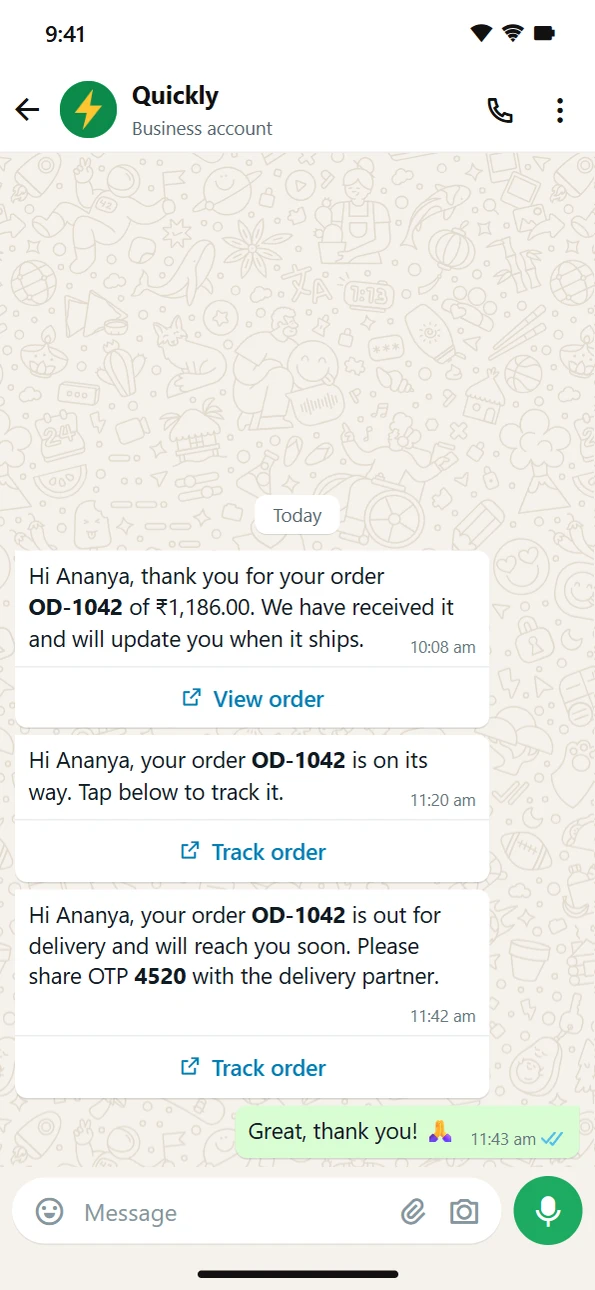
What WhatsApp messages cost on the Platform. Since 1 July 2025, Meta charges businesses per message on the WhatsApp Business Platform. Since 1 October 2026, replies to customers are charged too, after 1,000 free replies a month for each business number. Messages customers send you are free. Rates depend on the message type and the customer's country.
Mistakes WhatsApp sellers make
Messaging people who never opted in. It breaks WhatsApp's policy, and customers report and block numbers that do it.
Dispatching on a screenshot. Check the money in your bank first.
No order format. Ask for everything in one message, every time.
An outdated catalogue. Sold-out items that still show cost you trust.
Replying at all hours. Set hours and an away message; customers know when to expect a reply.
Your WhatsApp selling checklist
- WhatsApp Business app installed with a complete profile and hours
- Catalogue with clear photos, prices and collections
- Quick replies saved for order, payment, confirmation, delivery, shipping and returns
- Labels for every order stage
- Greeting and away messages switched on
- UPI QR code ready, and a habit of checking every payment in the bank app
- WhatsApp link and QR code shared in your bio, at the counter and on packaging
- A plan for when chats become too many: an online store with a WhatsApp button
Start with a well set up WhatsApp Business account. When it gets busy, add a store, and let WhatsApp do what it does best: talking to your customers.
Questions people ask
Is WhatsApp Business free?
What is the difference between the WhatsApp Business app and the WhatsApp Business Platform?
Can I take payments on WhatsApp?
Can I send offers to all my customers on WhatsApp?
How many photos can each product in a WhatsApp catalogue have?
When should I move from WhatsApp to an online store?
Sources
- Business features (WhatsApp Business app), WhatsApp Help Center
- How to create and maintain a catalog, WhatsApp Help Center
- Pricing on the WhatsApp Business Platform, Meta for Developers
- WhatsApp Business Messaging Policy, WhatsApp
- How to use broadcast lists, WhatsApp Help Center
Facts were checked against these sources on 19 Oct 2026. Rules and prices change: check the source before you rely on a figure. Read our editorial standards, or write to hi@zepio.io to report a mistake.